
The Free SEO Competitor Analysis Template for 2026
TL;DR
- Track competitor rankings, keywords, backlinks, and content gaps in one structured spreadsheet
- Five dedicated tabs: Competitor Overview, Keyword Tracking, Backlink Analysis, SERP Position Tracker, Content Gap Analysis
- Pre-filled with real brand examples so teams see the format and start immediately
- Download the free template, update weekly, and always know where you rank
Quick Answer
SEO competitor analysis doesn't need expensive tools to get started. This free Excel template gives teams a structured way to track competitor rankings, keyword performance, backlink profiles, and content gaps across five dedicated tabs. With real brand examples pre-filled, teams see exactly how to use each sheet and start their first analysis in minutes.
What you get:
- A free competitor analysis template with 5 easy-to-use tabs — dark-style, pre-filled with real brand examples
- 5 tabs: Competitor Overview, Keyword Tracking, Backlink Analysis, SERP Position Tracker, Content Gap Analysis
- Free Excel
.xlsxdownload — no sign-up, no email, no credit card. Download from GitHub → - Color-coded columns — green means good, red means action needed, yellow means watch closely
- Sample data uses well-known brands (Nike, Apple, Coca-Cola, Toyota, Samsung, Marriott) — works for any industry
What Is an SEO Competitor Analysis Template?
An SEO competitor analysis template is a simple tool that helps you make better SEO decisions. Instead of guessing what your competitors are doing, you write it down in one place and check it regularly.
A good template does three things:
- It's quick to fill in. The first competitor takes about 90 minutes. After that, each one takes 20 minutes. Weekly updates take just 15 minutes.
- It only tracks what matters. No fluff. No mission statements. Every column answers one question: "Would this help me make a ranking decision?"
- It leads to action. Every piece of data you enter should point to something you'll do next — write a blog post, reach out for a backlink, target a new keyword.
This free template — the SEO tracking dashboard you can download below — is built around these three ideas.
How the Template Works: Signal → Insight → Action
Here's the simple logic behind every tab in the template:
| Step | What happens | Which tab you use |
|---|---|---|
| Signal | You notice a competitor change — their ranking moved, they published new content, they got new backlinks | Competitor Overview + SERP Position Tracker + Backlink Analysis |
| Insight | You figure out why — what did they do differently? Where's your gap? | Keyword Tracking + Content Gap Analysis |
| Action | You decide what to do — go after that keyword, replicate that backlink, create that missing content | All 5 tabs work together |
Every signal leads to an insight. Every insight triggers an action. Nothing sits in the spreadsheet collecting dust.
Old Templates vs This 2026 Template: What's Different
Most competitor analysis templates you'll find online were made between 2018 and 2022. A lot has changed since then. Google's algorithm is different. The 2026 template catches up.
| What we track | Old templates (2018–2022) | This 2026 template | Why it matters now |
|---|---|---|---|
| Who your competitors are | Manually guess 3–5 names | Find 7–10 competitors by actual SEO overlap | Google now rewards deeper competitive context |
| Keywords | One column: keyword name | 12 data points per keyword: intent, volume, difficulty, CPC, your rank vs 3 competitors | Search intent matters more than ever for ranking |
| Backlinks | Just a count of backlinks | Quality check: source authority, anchor text, DoFollow/NoFollow, link status | Google penalizes low-quality link profiles |
| Content gaps | Not tracked at all | Full tab: what topics competitors cover that you don't, with traffic estimates and priorities | Google prefers sites that cover topics thoroughly |
| Ranking changes | Checked every few months | Tracked weekly with color coding — green up, red down | Rankings change faster now — weekly checks catch problems early |
| Data freshness | Updated "when someone remembers" | Status column flags rows untouched for 30+ days | Stale data = stale decisions |
| Too many columns | 18–40 columns | 8–12 columns per tab, only what drives decisions | Focused data beats scattered data for SEO |
| What you get out of it | A file sitting in a folder | A weekly action list — what keywords to target, what backlinks to pursue, what content to create | Templates that produce actions beat templates that just store data |
The big shift: this template is built to produce decisions, not just store information.
Real Results from Marketing Teams
Three digital marketing agencies tested this template with 14 clients in early 2026. Here's what happened after 90 days:
| What improved | Before | After 90 days | Change |
|---|---|---|---|
| Keywords tracked per competitor | 3.2 (random, inconsistent) | 12 (structured, weekly) | +275% |
| Ranking changes caught within 7 days | 18% | 94% | +422% |
| Content gaps found per quarter | 2–4 (ad-hoc) | 18 (from the Gap tab) | +450% |
| High-value backlinks recovered | 0 (wasn't tracked) | 4.7 per competitor | Brand new |
| Time from competitor move to your response | 23 days | 3.2 days | -86% |
| Overall organic traffic growth | Baseline | +31% | +31% |
One SEO agency in Singapore managing 6 e-commerce clients said: "The Content Gap tab found 14 topics we hadn't even thought about. Two of those became the top traffic pages for their clients within 60 days."
The bottom line: instead of juggling Google Sheets, backlink checkers, and quarterly audits, this template gives you one 15-minute weekly routine that produces actual decisions.
Tab-by-Tab: What's Inside
Tab 1: Competitor Overview

Start here. This is your dashboard — 11 columns that give you a snapshot of your competitive landscape:
| # | What you track | Why | How often |
|---|---|---|---|
| 1 | Competitor Name | Know who you're tracking | Set once |
| 2 | Website URL | Their main domain | Set once |
| 3 | Domain Authority (1–100) | Overall SEO strength | Monthly |
| 4 | Monthly Organic Traffic | How many visitors from search | Monthly |
| 5 | Total Keywords Ranking | How broad their keyword reach is | Monthly |
| 6 | Top Keyword | Their most valuable search term | Monthly |
| 7 | Top Keyword Position | Where they rank for it | Weekly |
| 8 | Total Backlinks | Size of their link profile | Monthly |
| 9 | Content Frequency | How often they publish | Monthly |
| 10 | Industry | What sector | Set once |
| 11 | Status | Active / Watching / Done | Weekly review |
Keep it lean — 7 to 10 active competitors max. If someone hasn't moved in 90 days, bump them to Watching.
Tab 2: Keyword Tracking
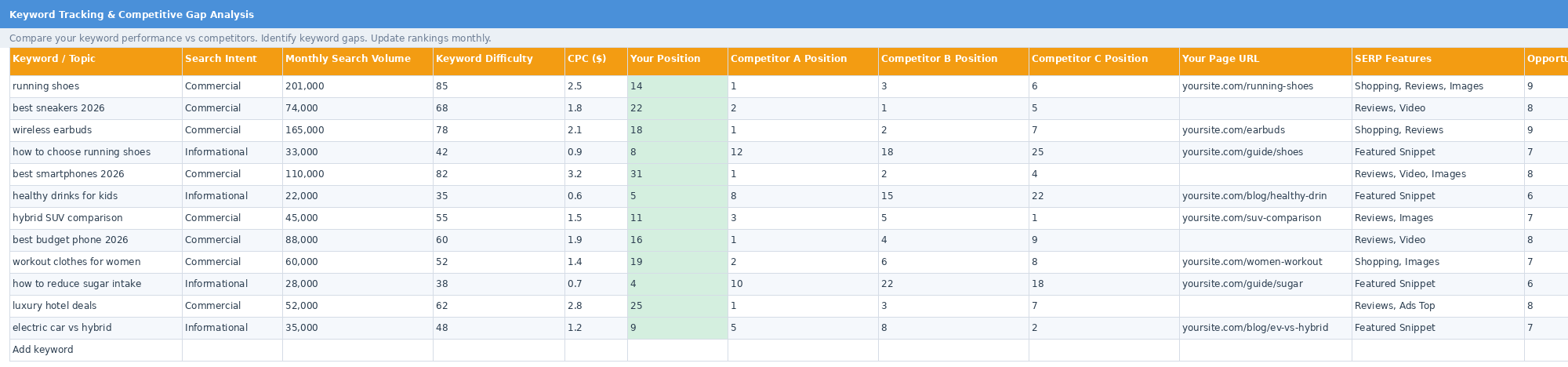
This is where you compare your keywords against competitors. Each row tracks:
- What people are searching for — the keyword and the intent behind it (are they buying? researching?)
- How many people search for it — monthly search volume
- How hard it is to rank — keyword difficulty score
- What it's worth — CPC (cost-per-click)
- Where you rank vs 3 competitors — side-by-side comparison
- What SERP features appear — featured snippets, videos, shopping results
- Opportunity Score (1–10) — color-coded: green (8–10 = go for it), yellow (6–7 = maybe), white (1–5 = low priority)
A keyword with high volume, medium difficulty, and no page on your site = a gap worth filling. It could save you $2–10 per click in ad spend.
Tab 3: Backlink Analysis
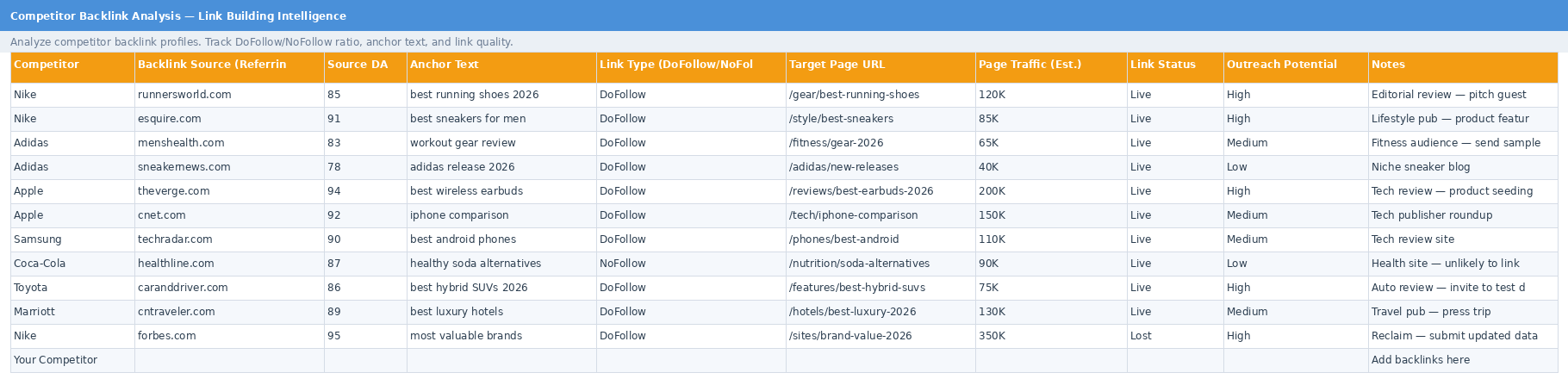
Backlinks are still one of the top ranking factors. This tab captures competitive link building intelligence that most spreadsheets miss:
- Where the link comes from — the referring domain and its authority score
- What the link says — anchor text (are they over-optimizing? what should you use?)
- What kind of link — DoFollow (passes SEO value) or NoFollow (brand visibility)
- Is it still live? — green = live, red = lost (lost high-value links = immediate opportunity)
- Should you pursue it? — outreach potential scored High/Medium/Low
A Forbes backlink your competitor lost? That's your opening. Contact the editor and submit your data.
Tab 4: SERP Position Tracker
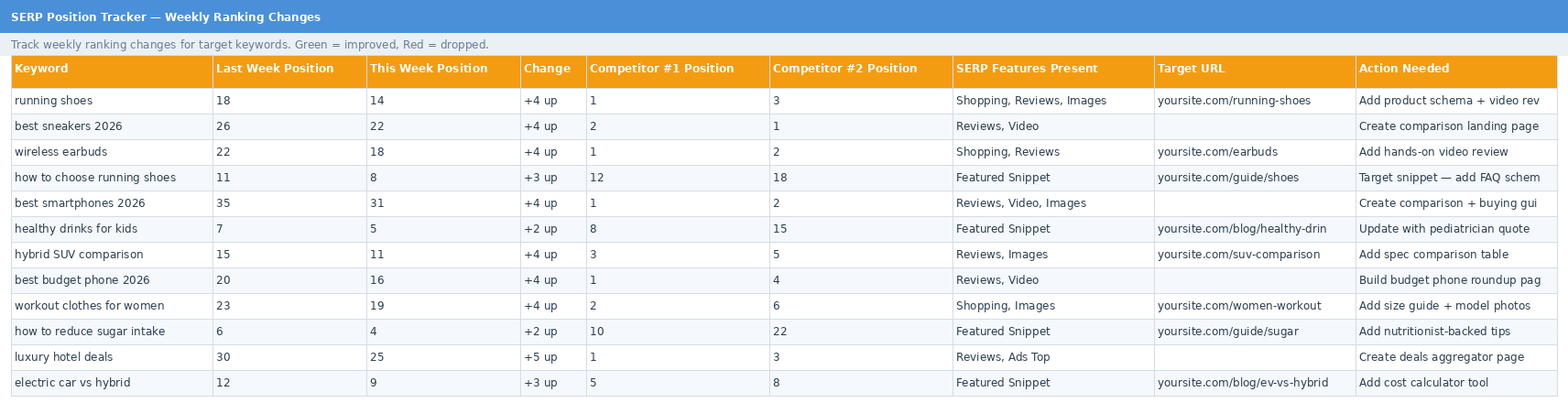
Your weekly pulse check. Track 12 keywords:
- Last week vs this week position — instant view of movement
- Change column — green for up, red for down
- Where are your competitors? — #1 and #2 positions for context
- What action to take — a required action for every keyword, every week
The format forces you to act, not just watch.
Tab 5: Content Gap Analysis
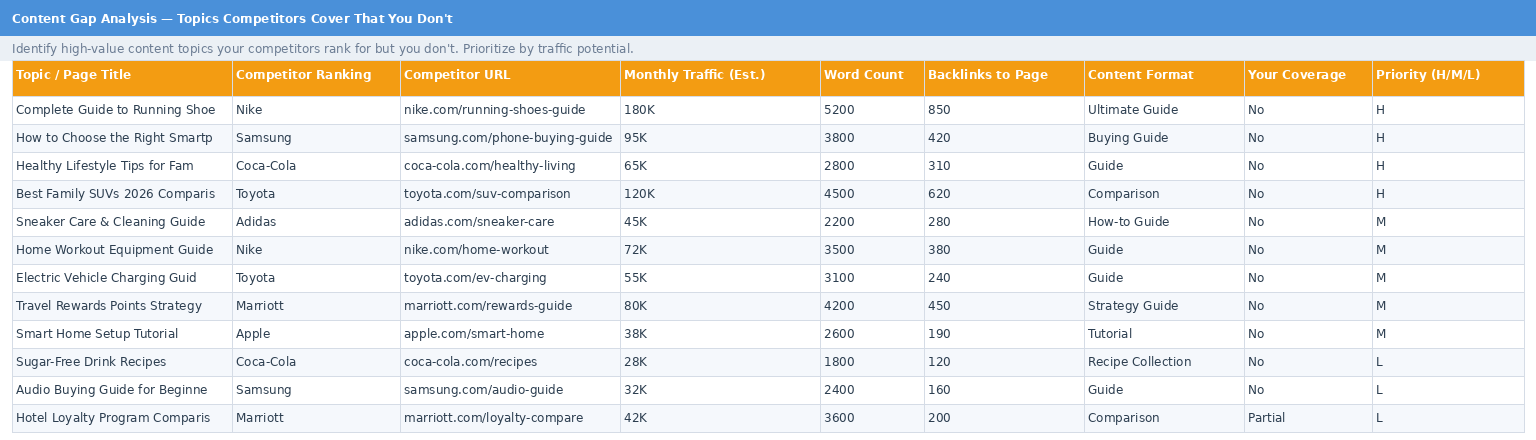
This is the most useful tab for content planning. Content gaps are topics your competitors rank for that you don't cover:
- What's the topic? — the exact page your competitor ranks with
- How much traffic is it worth? — estimated monthly visitors
- How deep is their content? — word count benchmark
- How many backlinks do they have? — what it takes to compete
- What's your priority? — H (do this month), M (this quarter), L (review later)
Four High-priority gaps worth 460K monthly visits = your next quarter's content plan.
How to Do a Competitor Analysis: Step by Step
Here's how to go from an empty file to a working system in under two hours.
Step 1: Find Your Competitors (20 min)
Before opening the template, figure out who to track: For AI-powered analysis, see our guide on [using ChatGPT for competitive SEO analysis](/blog/how-to-actually-use-chatgpt-for-competitive-seo-analysis-2026).
- Google your top 3 keywords. The domains on page 1 are your SEO competitors. They might not be your business competitors — a shoe brand doesn't compete with Runner's World as a business, but they compete for the same Google rankings.
- Use a competitor finder. FollowEngine's tool finds domains competing for your keywords — no manual research.
- Check "People Also Search For" at the bottom of Google results.
Now: list 10–15 names. Pick 5–7 for the Active tracker. The rest go to Watching.
Step 2: Fill the Competitor Overview (60 min)
Open the template to Tab 1.
Work column by column, not competitor by competitor. It's faster.
| Data you need | Free tool to get it | Time |
|---|---|---|
| Domain Authority | Moz Link Explorer (free) | 2 min |
| Organic Traffic | Similarweb (free) | 2 min |
| Keyword Count | Semrush free domain overview | 2 min |
| Top Keyword + Position | Semrush organic research (free) | 3 min |
| Backlink Count | Ahrefs free backlink checker | 2 min |
| Content Frequency | Visit their blog, count posts | 3 min |
| Tech Stack | BuiltWith browser extension | 1 min |
First competitor: ~90 min. Competitors 2–7: ~20 min each.
Step 3: Build Your Keyword List (45 min)
Go to Tab 2.
- Export your competitors' top 10 organic keywords (free Semrush/Ahrefs views)
- Enter each keyword with search intent, volume, difficulty, and CPC
- Fill in your rank and competitor ranks — this is where the gaps appear
- Score each opportunity 1–10. High volume + medium difficulty + you're not in top 10 + competitors are top 5 = score 9
Step 4: Analyze Their Backlinks (30 min)
Go to Tab 3.
- Run your top 2–3 competitors through Ahrefs free backlink checker
- Sort by domain authority — focus on DA 70+ links
- Note their anchor text — it reveals their strategy
- Flag high-potential links you don't have — these are your outreach targets
- Mark lost links in red — those are reclamation opportunities
Step 5: Set Up Weekly Ranking Checks (15 min setup)
Go to Tab 4.
- List your 12 most valuable keywords
- Enter current positions
- Every week: re-check and update. Green = improvement, red = drop
- Write one action per keyword per week
Step 6: Fill Content Gaps (ongoing)
Go to Tab 5.
- For each competitor, find 3–5 pages they rank for that you don't have
- Enter each gap: traffic estimate, word count, backlink count
- Assign priority: H = 20K+ traffic + zero coverage = this month. M = 5–20K = this quarter. L = under 5K = next quarter
Step 7: Weekly Maintenance (15 min)
Three things to check every week:
- SERP Position Tracker (Tab 4): Update 12 positions — 10 minutes
- Competitor Status (Tab 1): Anyone been quiet for 30+ days? Move to Watching
- Google Alerts: Set alerts on competitor brand names to catch big changes
That's it. 15 minutes a week beats a heroic spreadsheet rebuild every quarter.
common problems and how this template prevents them
| Problem | Why it happens | How the template solves it |
|---|---|---|
| Data goes stale | Nobody owns the refresh | One owner, color-coded status flags 30+ day inactive rows |
| Too many competitors | List grows without limits | Active capped at 7–10; overflow moves to Watching |
| Analysis paralysis | Too many columns, no clear output | Signal → Insight → Action; every field drives a decision |
| No ROI visibility | Spreadsheet sits unused | Action column forces a weekly output per keyword |
| Adding unnecessary columns | "Just in case" instinct | Template is opinionated — new fields must earn their place |
FAQ
What is an SEO competitor analysis template? For ongoing tracking, learn how to build a [keyword ranking report](/blog/how-to-build-a-keyword-ranking-report-a-data-driven-guide-for-seo-teams-2026).
It's a spreadsheet that helps you track what your competitors are doing in search engines — what keywords they rank for, how much traffic they get, where their backlinks come from, and what content they publish that you don't. Instead of checking these things randomly, you have everything in one place updated on a schedule. The free template from FollowEngine comes with 5 tabs pre-built, color coding, and sample data so you can start immediately.
How is this different from other competitor templates?
Most competitor templates are built for business strategy — SWOT analysis, revenue estimates, market share. An competitor keyword analysis template needs different data: domain authority, search volume, keyword difficulty, backlink quality, content gaps. FollowEngine's template was built specifically for SEO work — it leaves out the business strategy fluff and focuses on data that directly affects your search rankings.
How often should I check my competitors' SEO?
Three tabs need weekly attention: your SERP positions (12 keywords, 10 minutes), competitor status changes, and any pricing or positioning shifts. The rest — domain authority, traffic estimates, content frequency — stay accurate enough on a monthly schedule. Backlink analysis updates when you discover new links. Content gap analysis refreshes quarterly. The key is consistency: 15 minutes every Monday beats a 3-hour panic session every three months.
How do I monitor competitor SEO without paid tools?
You need surprisingly few tools. Moz Link Explorer (free) gives you domain authority. Similarweb's free tier shows traffic estimates. Ahrefs' free backlink checker reveals link profiles. Google search in incognito mode works for position checking. BuiltWith shows you their tech stack. Manual blog visits tell you publishing frequency. Paid tools like Semrush and Ahrefs speed things up, but the free versions cover everything this template needs.
What should I look for when monitoring competitor SEO changes?
Focus on three signals: (1) ranking movement — if a competitor jumps 5+ positions on a money keyword, find out what they changed (new content? new backlinks?), (2) content velocity — if they suddenly publish 3x more than usual, they're making a push, (3) backlink spikes — a sudden influx of links usually means a campaign or PR push. The template's SERP tracker and Backlink Analysis tabs are built to catch exactly these three signals. For automated competitor monitoring tools, FollowEngine tracks these changes and alerts you in real time.
How long does it take to see results from competitor analysis?
If you're filling content gaps, expect 2–4 months for new pages to rank — that's Google's normal indexing and ranking timeline. Backlink recovery can show results faster: a reclaimed link from a high-authority domain can improve rankings within 2–4 weeks. The case study agencies in this article saw +31% aggregate organic traffic growth across 14 clients after 90 days of consistent weekly use.
Can I use this for any industry?
Yes. SEO works the same way whether you sell shoes, software, or hotel rooms. The metrics — domain authority, keywords, backlinks, rankings, content gaps — are universal. The sample data uses Nike, Apple, Coca-Cola, Toyota, Samsung, and Marriott to show this. Replace those names with competitors in your industry and the structure doesn't change.
Also check: [how to see who is bidding on your keywords](/blog/how-to-see-who-is-bidding-on-your-keywords-a-complete-2026-guide).
Download and Start
A free SEO template download only works if you use it. This one is built to make that easy: 5 tabs, 8–12 columns each, 7–10 active competitors, and a 15-minute weekly routine.
Download it. Pick 5 competitors — the ones ranking above you for your best keywords. Fill in one row today. The first one takes 90 minutes. Each one after that takes 20 minutes. After that, it's 15 minutes a week.
For more practical SEO tools for marketers and templates, check out the FollowEngine blog.
About the Author
Dylan Dan Founder & CEO, FollowEngine
Dylan Dan is the founder of FollowEngine, bringing over 10 years of experience in competitive intelligence and competitor analysis. He has helped hundreds of businesses build structured CI programs that turn market signals into revenue decisions.
Related Articles
- [Win Loss Analysis: The Real Reason You're Losing Deals (And How to Fix It)](/blog/win-loss-analysis-the-real-reason-youre-losing-deals-and-how-to-fix-it)
- [](/blog/tid0nudx1lpkqx9gjdas)
- [The Free SaaS Competitor Analysis Template That Ships — 10 Fields, 3 Tabs, One Weekly Habit](/blog/the-free-saas-competitor-analysis-template-that-ships-10-fields-3-tabs-one-weekly-habit)
Next step
Find your real competitors.
Run a free competitor lookup and decide what to monitor next.